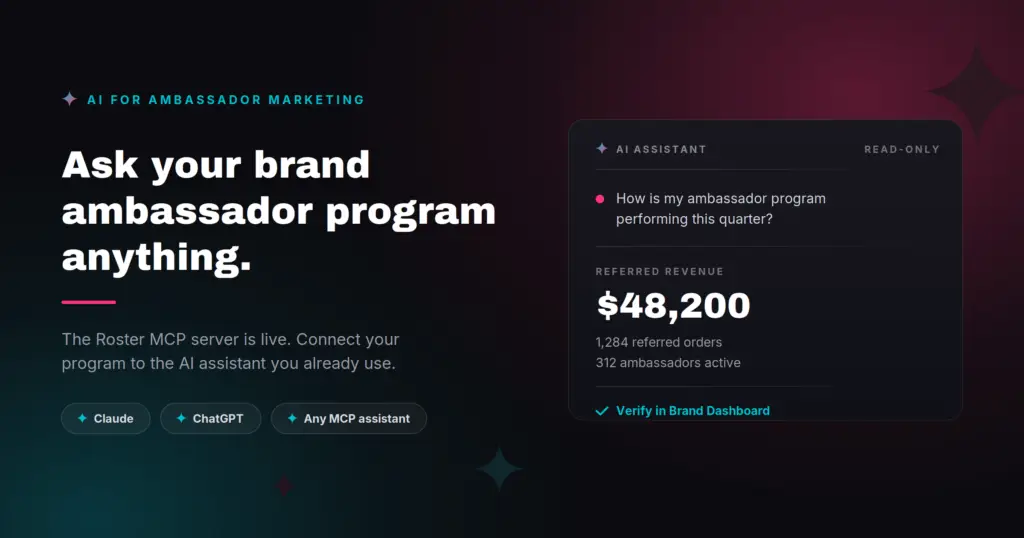
The Roster MCP Server puts your live program data inside the AI assistant you already use. Plain-English questions in, dashboard-accurate answers out.
If you run a brand ambassador program, you know the drill. Multiple teams need the quarterly ROI story. Finance wants commissions reconciled. Your founder wants to know who the top creators were this month and what they posted. Each answer lives in a different report, and pulling them together means exporting CSVs, wrangling spreadsheets, and hand-building a deck.
We built the Roster MCP Server to skip all of that. Connect Roster to your AI assistant, whether that’s Claude or ChatGPT, and just ask. In plain English. Because the answers come straight from the same reports your Brand Dashboard runs on, you can trust the numbers and click through to verify them.
Available now. The Roster MCP Server is live for every Roster customer at no extra cost.
“Brands know word-of-mouth works. What they have never had is a fast, defensible way to prove it and act on it. Our AI launch goes straight at that: ask how your program is performing, get an accurate answer in seconds from the same reports our Brand Dashboard runs on. When proof takes seconds instead of an afternoon, brands stop reporting on this channel and start scaling it.”
— Raj Nijjer, CEO, Roster
What it’s like to use the Roster MCP
Once connected, you start a normal conversation with your assistant and ask about your program. A few things brands are trying first:
“How is my ambassador program performing over the last 30 days? Build me an executive summary.” → Your program dashboard, covering applicants, members, posts, engagement, earned media value, and referred revenue, written up as a summary with a link back to the Brand Dashboard so you can verify every figure.
“Who are my top 10 ambassadors by referred revenue this quarter? Include their commissions.” → The same Sales Attribution report you’d open under Reports, ranked and ready to paste into an email.
“Which ambassadors generated the most earned media value last month, and what did they post?” → Your top EMV drivers, combined with their actual posts and links.
“Give me approved ambassadors with email, phone, and Instagram handle, as a CSV.” → A clean export formatted for your SMS or email tool. No report-builder gymnastics.
“How did the Summer Launch campaign do? Compare invites to completions.” → The campaign’s funnel, content created, reach, and engagement, summarized.
“What used to take an afternoon of exporting and cross-referencing now takes Q&A with Claude or ChatGPT. With the Roster MCP connected, our whole team can ask for anything related to the brand ambassador program — a month-over-month comparison, what worked last Black Friday — instead of waiting on the one person who knows where the reports live.”
— Caroline Nordmann, Manager of Community & Emerging Sports, VKTRY Gear
How to connect the Roster MCP
Three steps, and you only do this once.
- Add the connector. Wherever your assistant asks you to “add a custom connector” or “add an MCP server,” paste the Roster URL: https://mcp.getroster.com/mcp
- Sign in with your Roster login. A Roster window opens and you sign in with the same credentials you use at app.getroster.com. Your assistant never sees your password.
- Pick your brand and approve. If your login has access to more than one brand, choose the one to connect, then approve a read-only consent screen. That’s it.
Two things worth knowing before you start:
- In Claude, custom connectors are available across plans. On Team and Enterprise, an organization Owner adds the connector once before individual users can enable it.
- In ChatGPT, custom MCP connectors run through Developer Mode on a paid plan, so there’s an extra toggle to flip first.
Full step-by-step guides for Claude, ChatGPT, and Codex are in our help center: Connect Roster to AI assistants.
Use cases, by what you’re trying to get done
Those first questions barely scratch the surface. Here’s where ecommerce brands are getting the most value, grouped by the job you’re doing.
Prove ROI and build the executive story
The one everyone reaches for first. Instead of assembling a quarterly deck by hand, ask for it:
- “What’s my ambassador program ROI this quarter, referred revenue against commissions and rewards? Write it up for a board slide.”
- “Summarize earned media value and referred revenue for the last 90 days, with the trend versus the prior quarter.”
- “Give me three headline wins from my program this month I can share with the leadership team.”
Reconcile commissions and run finance audits
The questions dashboard filters can’t always answer on their own:
- “List referral rewards by ambassador for last month, split into pending, approved, and paid.”
- “Which ambassadors have approved commissions still awaiting payment?”
- “Break down attributed orders by discount code so I can reconcile them against payouts.”
Find your best ambassadors, and the ones going quiet
- “Rank my ambassadors by referred revenue this quarter, and show their commissions.”
- “Who were my top 10 ambassadors by earned media value last month, and what did they post?”
- “Which previously active ambassadors haven’t posted or referred a sale in the last 60 days?”
- “Pull a profile on this ambassador: their referral revenue, posts, engagement, and last activity.”
Export clean lists for your other tools
The single highest-frequency ask, minus the report-builder friction:
- “Give me approved ambassadors with email, phone, and Instagram handle, formatted as a CSV.”
- “Build a list of ambassadors in my VIP program with their contact details, ready for Klaviyo.”
Run campaign and content post-mortems
- “How did the Summer Launch campaign perform: invites, completions, reach, engagement, and EMV?”
- “Compare my last two campaigns side by side and tell me which drove more referred revenue.”
- “What are my ambassadors posting about us right now, and which posts are getting the most engagement?”
Drill into sales attribution
- “Show attributed orders for the last 30 days, referred versus personal purchases.”
- “Which referral codes drove the most revenue this quarter?”
Get setup help and answers from the docs
The MCP server can also read Roster’s help docs, so your assistant can answer product questions in context:
- “How do I set up a milestone series in Roster?”
- “Why might a referral code not be tracking sales, and how do I check it?”
Tip: because this works in any MCP-enabled assistant, you can build these into recurring workflows. A Monday-morning program summary, a monthly commission reconciliation, a per-campaign wrap-up, each rerun with a single prompt.
What’s happening under the hood
The Roster MCP Server is built on the Model Context Protocol (MCP), supported by Claude, ChatGPT, and a growing list of tools. You don’t need to know any of that to use it, but here’s what actually happens when you ask a question.
Your assistant reads your question and picks the matching Roster report, the same one you’d open yourself. It requests that report through the connector, using your read-only, single-brand access. Roster returns the figures exactly as the Brand Dashboard would calculate them, along with the link to the page they came from. Your assistant then writes the answer in whatever shape you asked for, whether that’s a board summary, a ranked list, or a CSV.
The important part is what does not happen. Nothing gets recalculated, estimated, or inferred. The assistant formats the numbers. It never produces them.
AI built to be trusted
Handing an AI assistant access to your program data is a big deal, so we designed this to be conservative by default.
It’s read-only
The assistant can read your data, but it can never change anything. No edits, no sends, no tagging, no payments. There is no path for it to write.
The numbers match your dashboard, exactly
This is the part we care about most. The MCP server doesn’t recompute or estimate anything. It reads from the same reports your Brand Dashboard uses. If your assistant says referred revenue was $48,200 this quarter, you can click through and see the same $48,200 in your Sales Attribution report.
Same data, same numbers, verifiable on every answer, so an AI summary never drifts from your source of truth.
Your login stays yours
Sign-in uses OAuth, the same standard behind “Sign in with Google.” Roster handles the login, and your assistant only ever receives a read-only, single-brand connection. Never your password. You can cut access instantly from either side: remove the connector in your assistant, or revoke it under Brand Dashboard → Integrations → AI Connections.
Why this matters for ecommerce and DTC brands
Ambassador marketing involves a lot of touch points and data points: referral sales, social content, earned media value, campaign funnels, leaderboards, who’s active and who’s gone quiet. Roster already brings ambassadors, affiliates, and creators together in one system, so the data is in one place. What’s changed is how fast you can get an answer out of it.
That speed is what turns a program into a channel you can scale. When the answer takes seconds instead of an afternoon, the same team can run a larger program, and you can put budget behind what’s working while it still matters. It’s the difference between reviewing the channel after the quarter closes and growing it during.
Whether you’re on Shopify, BigCommerce, or WooCommerce, if your ambassador data lives in Roster, it’s now one question away.
Get connected
The Roster MCP Server is available now for every Roster brand. Head to the setup guide, add it to your assistant, and ask your first question.
To learn more about Roster’s brand ambassador platform, request a demo here.
Frequently asked questions
Does this cost extra? No. The Roster MCP Server is included for every Roster brand.
Can the AI assistant change anything in my account? No. Access is strictly read-only. It cannot edit records, send messages, tag ambassadors, or issue payments.
Which AI assistants does it work with? Claude, ChatGPT, and Codex, plus any other assistant that supports remote MCP connectors. Setup guides are in our help center.
Where do the numbers come from? The same reports that power your Brand Dashboard. Nothing is recomputed or estimated, and every answer links back to the source page so you can verify it.
How do I turn it off? Remove the connector in your assistant, or revoke access under Brand Dashboard → Integrations → AI Connections. Either side works, and it takes effect immediately.
Does it integrate with Shopify, BigCommerce, and WooCommerce stores? Yes. It reads whatever program data is already in your Roster account, regardless of which platform your store runs on.